Your Health Information. Your Google Drive.
Your Control.
Health information is personal. You should know where it is kept, how it is used, and who can see it.
When you use HealthScores.ai, you are choosing to store a copy of your personal health information in Google Drive. This Google Drive account is controlled by you. HealthScores.ai will use your authorization to create and display your document and structured health data in a FHIR bundle in the HealthScores.ai application. After the file is stored in your Google Drive, access, sharing, retention, deletion, and security depend on your personal Google account settings.
YOU SHOULD NOT USE HEALTHSCORES.AI IF YOU ARE NOT COMFORTABLE STORING YOUR HEALTH INFORMATION IN GOOGLE DRIVE.
HealthScores.ai is designed around member control. Your Google Drive is the primary home for the health records and documents you connect or update through HealthScores.ai. You choose which information to bring together, which features may use it, and when to share it with someone you trust.
In simple terms:
- Your health records are stored in your Google Drive as a file within a folder.
- HealthScores.ai needs your permission to connect to Google Drive.
- You choose what to connect and what to share.
- You can review or remove access.
- We explain what the product can and cannot do.
Do HIPAA protections apply to HealthScores.ai?
HealthScores.ai is a member-directed consumer health application. HIPAA usually applies to health plans, doctors, hospitals, and certain companies working for them. The original records held by your doctor, hospital, or Medicare remain subject to the privacy laws that apply to those organizations. When you ask for a copy and direct it to a consumer application or your personal Google Drive, that copy may not be protected by HIPAA in the same way. We believe you deserve to know that clearly. Please note that HealthScores.ai is not required to comply with HIPAA.
How the Google Drive approach works
We collect information you give to us and information we get from your use of our Site, as more fully described below. We refer to this information as "Personal Information."
1. You choose to connect
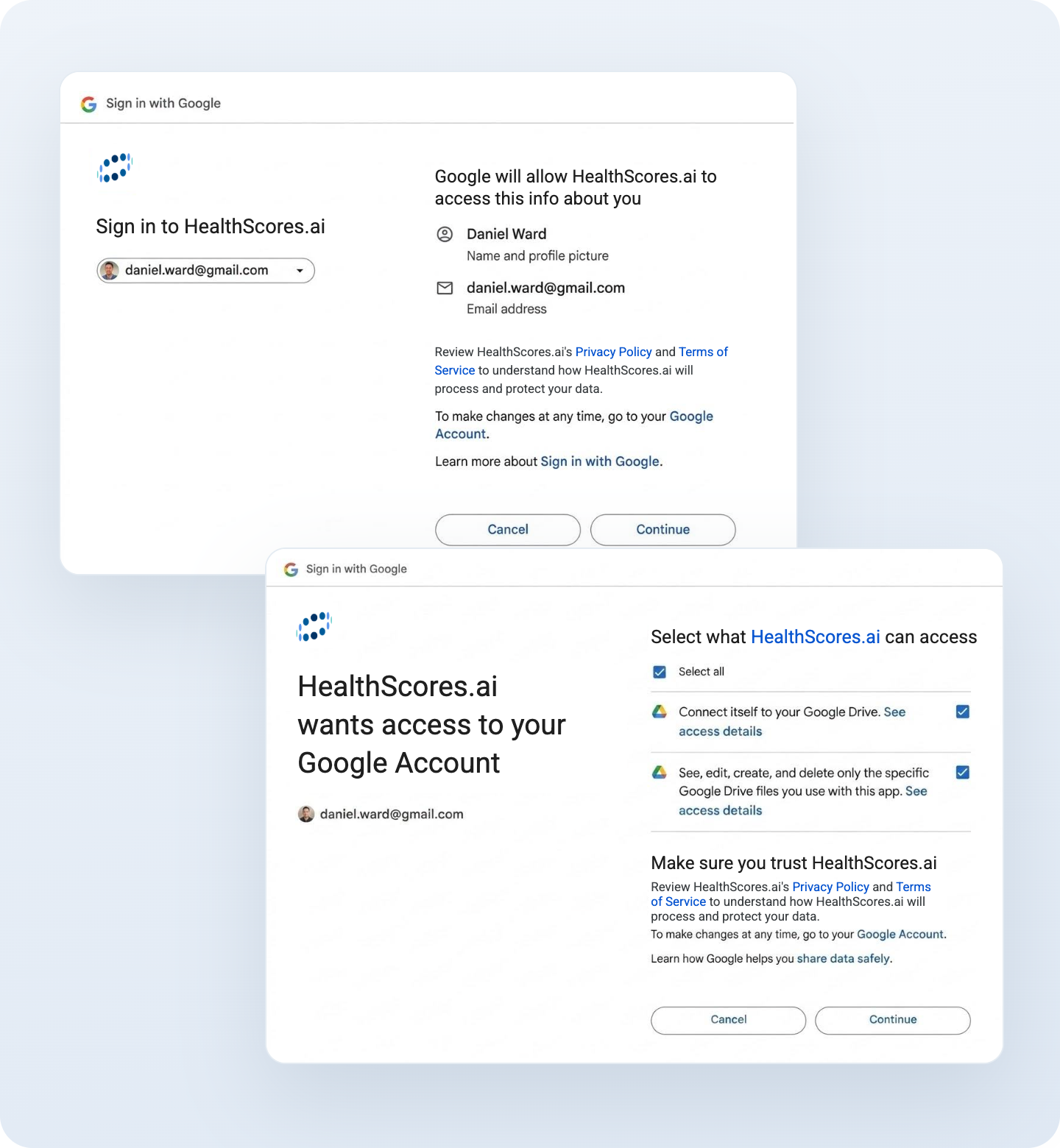
HealthScores.ai does not connect to your Google Drive without your approval. Google shows you a permission screen before access is granted. Review that screen before you continue.
HealthScores.ai does not need your Google password. You sign in through Google, and Google manages the sign-in process.

2. Your records have a home you already control
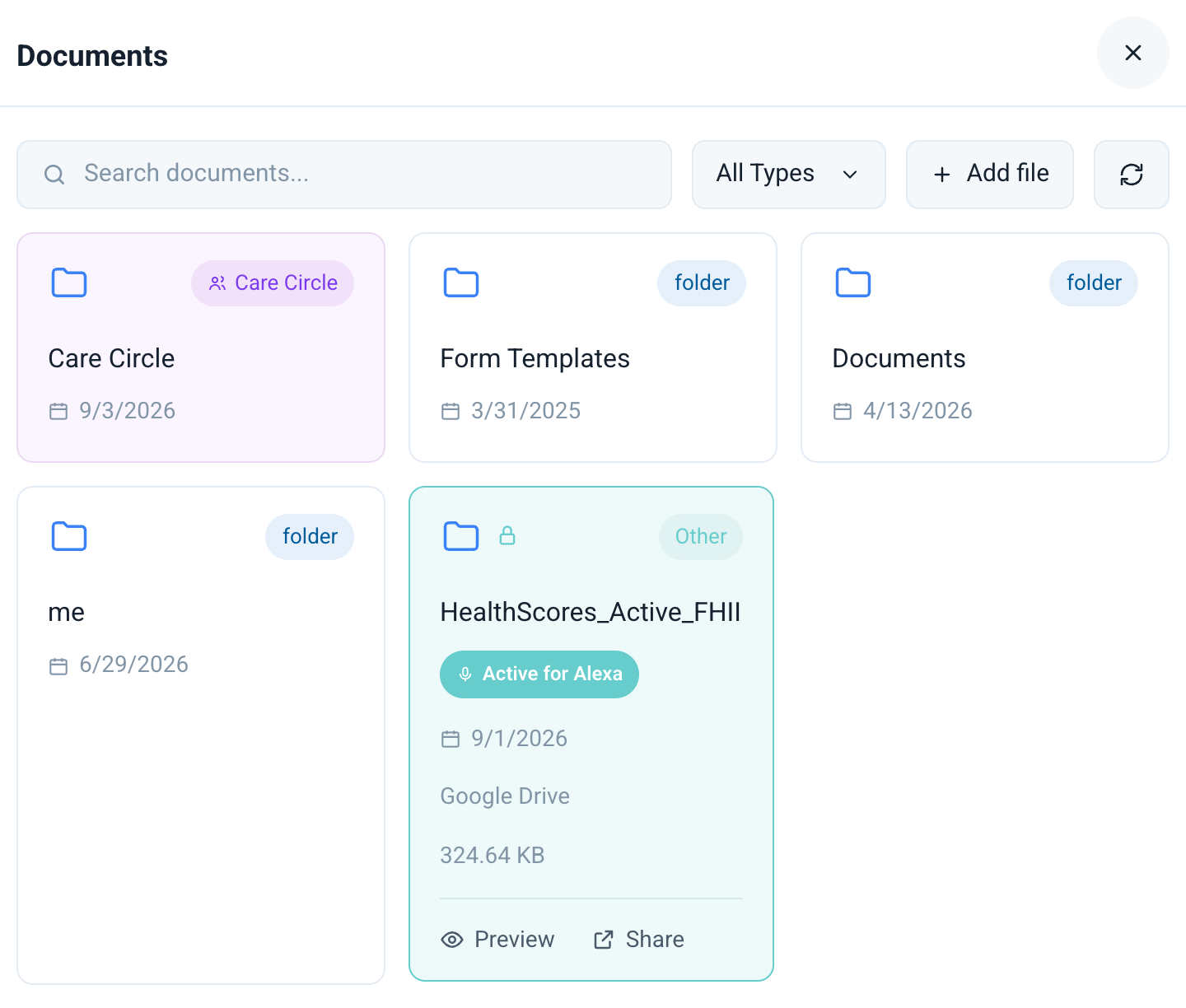
HealthScores.ai uses a HealthScores folder in your Google Drive as the primary storage location for your connected health documents. Depending on the source, those files may include medical-record documents, PDFs, or structured health information.
You can open Google Drive to see the files stored there. You can also use Google Drive controls to manage sharing, move files to trash, or delete them. Uploading files with the Google Drive controls IS NOT recommended. Those files may not be visible to HealthScores.AI so use the Add File button instead.

3. HealthScores.ai uses information to provide the feature you request
When you ask HealthScores.ai to organize records, create a summary, calculate a health score, fill in a form, or prepare information to share, the app reads and processes the information needed for that task.
Information in your Google Drive may be used by HealthScores.ai to complete the action you requested. HealthScores.ai uses only the information needed for that purpose.
4. You decide what to share
You may choose to share selected information with:
A. Family members, friends, caregivers, advocates, and others (your “Care Circle Participant(s)”)
B. Healthcare providers and emergency services personnel (“Practitioner(s)”).
Care Circle Participants and Practitioner(s) are, collectively, your “Care Circle”.
Before sharing, review:
- who will receive access;
- which information they will be able to see; and
- whether they can only view the information or can also take another action.
You can change or remove access for people in your Care Circle. Remember that removing access cannot retrieve a copy that another person already downloaded, printed, photographed, or saved.
5. You can disconnect access
Disconnecting the app and deleting your files are two different steps. When you disconnect the app, your health files will remain in your Google Drive. To delete your information, you must remove those files from your Google Drive and then empty your Trash.
How your information is protected
HealthScores.ai uses several layers of protection. No online service can promise perfect security, but these safeguards are intended to reduce risk and keep you in control.
Google Drive security
As of the date of this document, Google states that files in Drive are encrypted while they travel between your device and Google and while they are stored in Google’s systems. Your Google Account also gives you tools to review connected apps, manage file sharing, and remove access.
Permission-based access
HealthScores.ai must ask for permission before connecting to Google Drive. Google shows the type of access requested. You have the ability to review connected apps and remove HealthScores.ai access through your Google Account.
Member-directed sharing
HealthScores.ai is designed so you choose who is invited to your Care Circle and what each person can see. You can limit access based on that person’s role and needs.
Original records and member updates
Information received from a provider, health plan, or other source may be incomplete or out of date. HealthScores.ai is designed to keep the source information and let you add a correction or update for your own use. A change you make in HealthScores.ai does not automatically change the original record held by your doctor, hospital, or health plan.
Security monitoring and limited use
HealthScores.ai may use account, device, and service activity information to operate the app, prevent fraud, investigate problems, and protect members. The HealthScores.ai
Privacy Policy provides more detail about what is collected and why it is needed.
How HealthScores.ai uses AI
HealthScores.ai uses artificial intelligence to help organize information, explain medical terms in plain language, identify changes, and prepare questions you may want to discuss with a healthcare professional.
AI can make mistakes. A summary or health score may miss information, misunderstand a record, or rely on information that is no longer current. Review important details against the original record. Speak with a qualified healthcare professional who is caring for you before making a medical decision using HealthScores.ai or any other artificial intelligence tool.
Health information stored on your Google Drive, and HealthScores.ai summaries or conversations that use it, are not used to train general-purpose AI models or target advertising. We use this information only to create a summary of your data, protect the service, and meet the obligations described in our
Privacy Policy.
Special care for emergency sharing and QR codes
HealthScores.ai will allow you to create an emergency view and utilize a QR code connected to your data so important information can be available when you cannot speak for yourself.
Standard information, if applicable, includes:
- your name and emergency contact;
- current medications;
- serious allergies;
- major medical conditions;
- advance-directive information; and
- other details you choose.
Depending on the sharing option you select, a person with an active link or QR code may be able to view the information you placed in that emergency view. Review the information regularly. Remove anything that is no longer needed, and replace or deactivate access if a QR code sleeve is lost. If you lose your QR code sleeve, reach out to our support team, and we will assist you in getting a replacement.
What you can do to protect your information
You play an important role in protecting your Google Drive and HealthScores.ai account.
- Turn on 2-Step Verification or a passkey for your Google Account.
- Use a screen lock on your phone, tablet, and computer.
- Never share your Google password with HealthScores.ai or another person.
- Review the permission screen before connecting an account.
- Check your Care Circle and Google Drive sharing list from time to time.
- Remove access for people or apps you no longer use.
- Share only the information needed for the situation.
- Contact HealthScores.ai support if something does not look right.
Your choices at a glance
If you do this
What happens
Disconnect a medical-record source
New information stops coming from that source. Information already saved in Google Drive may remain until you delete it.
If you do this
What happens
Remove HealthScores folder from your Google Account connections
HealthScores.ai can no longer use the Google access you previously granted. Files already in Google Drive remain there.
If you do this
What happens
Remove a person from your Care Circle
That person loses future access through HealthScores.ai. Note: Copies already downloaded, printed, or saved cannot be recalled.
If you do this
What happens
Delete a HealthScores.ai file or folder in Google Drive
The item moves to Google Drive Trash and may remain recoverable for a limited time.
If you do this
What happens
Empty Google Drive Trash
Google permanently deletes the selected files according to its deletion process.
If you do this
What happens
Close your HealthScores.ai account
HealthScores.ai account information is managed according to its Privacy Policy and corporate retention rules. Files in your personal Google Drive will require a separate deletion step.
Your choices at a glance
If you do this
What happens
Disconnect a medical-record source
New information stops coming from that source. Information already saved in Google Drive may remain until you delete it.
Remove HealthScores folder from your Google Account connections
HealthScores.ai can no longer use the Google access you previously granted. Files already in Google Drive remain there.
Remove a person from your Care Circle
That person loses future access through HealthScores.ai. Note: Copies already downloaded, printed, or saved cannot be recalled.
Delete a HealthScores.ai file or folder in Google Drive
The item moves to Google Drive Trash and may remain recoverable for a limited time.
Empty Google Drive Trash
Google permanently deletes the selected files according to its deletion process.
Close your HealthScores.ai account
HealthScores.ai account information is managed according to its Privacy Policy and corporate retention rules. Files in your personal Google Drive will require a separate deletion step.
Information may be incomplete or out of date
HealthScores.ai can only use the information that is available from the sources you connect. A record may be missing because:
- a practitioner or facility is not connected;
- an older record is still being processed;
- a source does not make every type of information available;
- a medication or condition has not been updated; or
- information was entered incorrectly.
Check important details against your patient portal, Medicare account, pharmacy information, or the original document. Update the HealthScores.ai application when your medical information changes.
HealthScores.ai supports your care. It does not replace it.
HealthScores.ai is designed to help you understand, organize, and share information. It does not diagnose a condition, provide emergency care, or replace the judgment of a qualified healthcare professional.
Do not delay emergency care when using HealthScores.ai. In an emergency, call 911 or your local emergency number.
Questions or concerns
If you have a question about your information, believe someone has access who should not, or want help with an account or deletion request, contact:
Email: support@healthscores.ai
Phone: (845) 2HEALTH / (845) 243-2584
For complete information about collection, use, disclosure, retention, and deletion, review the HealthScores.ai
Privacy Policy and Terms of Use.
Recommended Help Center Documentation
The page above should be supported by a small group of short articles. This makes the information easier to find and easier for members to follow.
Member Questions
What members
ask most
What is HealthScores.ai?
HealthScores.ai helps you bring health information from different places into a clearer, more useful view. Depending on availability, you may connect information from healthcare portals, documents, and supported health or wearable sources.
The app can help you:
- keep important health information together;
- see a plain-language summary;
- review medications, allergies, conditions, and other details;
- notice changes over time;
- prepare for a healthcare visit;
- complete and share forms; and
- share selected information with people you trust.
HealthScores.ai is for adults who want help organizing their own information and for people they authorize, such as caregivers or advocates.
Why does HealthScores.ai use Google Drive?
Your medical information may be spread across many portals and documents. HealthScores.ai uses your Google Drive as a single location for you to manage your medical information.
Google Drive allows you to:
- view your HealthScores.ai files;
- control your Google Account security;
- manage file and folder sharing; and
- delete files you no longer want to keep.
Google Drive is a separate service provided by Google. Your use of Google Drive is also governed by your agreement and privacy settings with Google.
How do I connect Google Drive?
- Sign in to HealthScores.ai.
- Choose the option to connect Google Drive.
- Select the Google Account you want to use.
- Read the Google permission screen.
- Choose whether to allow the requested access.
- Return to HealthScores.ai and continue setup.
Only connect an account you control. Do not connect a shared account unless everyone who can open that account is permitted to see your health information.
How do I add health information?
HealthScores.ai will allow you to connect a supported medical-record source, import a document, connect a supported wearable source, or add information yourself. The first import may take time. When it is finished:
- Review your name and basic details.
- Review medications and allergies first.
- Check major conditions, procedures, and recent visits.
- Compare important information with the original source.
- Add a correction or note if something is incomplete or old.
Do not remove a source record simply because you disagree with it. Keep the original source and add your update so you and the people helping you can understand what changed. See the FAQ below on “How do I review or correct health information” for how to make updates.
How is my information used in HealthScores.ai?
HealthScores.ai uses your curated information when needed to provide a feature you choose. Examples include:
- creating a health summary;
- calculating or updating your health score;
- comparing current information with earlier information;
- preparing questions for an appointment;
- filling a form;
- creating an emergency view; or
- sharing selected information with a person you authorize.
HealthScores.ai uses only the information needed for the action. The app also explains when information will be shared outside your account.
How do I review or correct health information?
Medical records can be incomplete or old. A medication may still appear after you stopped taking it, or a condition may be missing.
When you find a problem:
- Check the original record.
- Add the current information in HealthScores.ai.
- Contact the provider or health plan if the original record also needs to be corrected.
An update in HealthScores.ai does not automatically update the provider’s record.
How do I share with a caregiver, advocate, or practitioner?
Use the Care Circle to invite a trusted person. Choose the access level that best matches what the person needs to do.
- A viewer is someone you want to keep informed and gets notified of changes to your health score. A viewer is not able to access your health profile in HealthScores.ai. They see your dashboard with scores, history, and current pillar values.
- A caregiver is a family member or other person who helps to manage day-to-day care (appointments, medications, etc.). Caregivers have access to your dashboard and your entire health profile within HealthScores.ai.
- An advocate is a third party (typically not a family member unless they have a medical power of attorney (POA)) who helps you to understand information presented during and after appointments, helps you to prepare questions, and supports you during appointments. Advocates have access to your dashboard and your entire health profile within HealthScores.ai.
- A Practitioner is someone you want to share relevant health information with to support evaluation, treatment, or care coordination. Practitioners have access to your dashboard and your entire health profile within HealthScores.ai.
Review access often. Remove a person when that access is no longer needed.
How do I disconnect HealthScores.ai from Google?
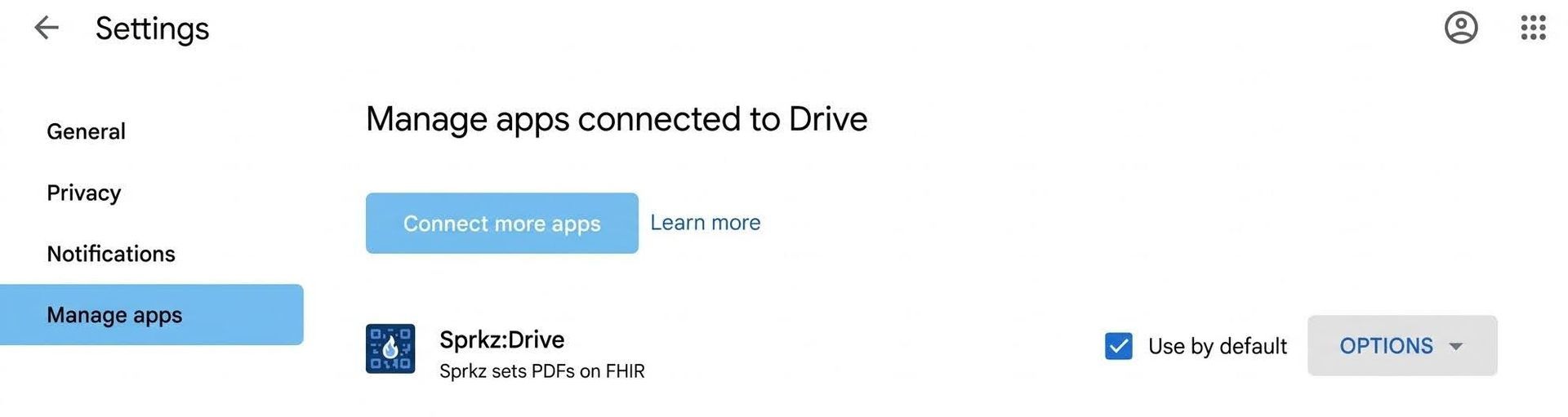
To stop HealthScores.ai from accessing your Google Account:
- Open your Google Account.
- Go to the page for third-party connections or connected apps.
- Select Sprkz:Drive.
- Review the connection.
- Choose the option to remove or delete the connection.
This revokes the Google access you granted. It does not necessarily delete HealthScores.ai files already stored in Google Drive.
How do I delete HealthScores.ai files?
- Open Google Drive.
- Find the HealthScores folder or the individual file.
- Confirm that you no longer need the information.
- Move the file or folder to Trash.
- If you want permanent deletion, open Trash and delete the item forever.
If a file is shared, review or remove sharing before deletion. Deleting your HealthScores.ai account and deleting Google Drive files may be separate actions.
What should I know about AI summaries and health scores?
AI can help make a long record easier to read. It can also make mistakes.
- A summary may leave out a detail.
- A source record may be wrong or incomplete.
- A health score is not a diagnosis.
- A trend does not prove what caused a change.
- An alert does not replace medical advice or emergency care.
Use HealthScores.ai to help you ask better questions, but keep in mind that any returned results do not constitute medical advice. Qualified healthcare professionals should help you to make any medical decisions.
Do HIPAA protections apply to HealthScores.ai?
HealthScores.ai is a member-directed consumer health application. HIPAA usually applies to health plans, doctors, hospitals, and certain companies working for them. The original records held by your doctor, hospital, or Medicare remain subject to the privacy laws that apply to those organizations. When you ask for a copy and direct it to a consumer application or your personal Google Drive, that copy may not be protected by HIPAA in the same way. We believe you deserve to know that clearly. Please note that HealthScores.ai is not required to comply with HIPAA.