
Care Circle
The people who help you, finally in the loop
Your Care Circle is the group of family members, caregivers, and advocates you choose to support your health and well-being. You decide who is in your Care Circle and exactly what information each person can see.
Medicare members get a free 90-day trial of the web app. Joining someone's Care Circle is free.
The people in your corner, connected
What is a Care Circle?
A Care Circle is the group of people you let into your HealthScores.ai account, each with the access you choose.
If you're on Medicare, someone else probably knows part of your story. A daughter who sits in on cardiology appointments. A husband who counts out the pills each Sunday. A neighbor who drives you to dialysis. A professional advocate who advocates for you with the insurance company on your behalf. Each holds a piece, and none can see the whole picture. A Care Circle fixes that. You invite the people who help you into HealthScores.ai, and each of them gets a view of your health that matches their role.
How it works
Beyond a group text to a real support system in four steps
01
Invite your Care Circle contacts.
Add family, friends, paid caregivers, professional advocates, and your doctors. Note how each person is related to you, like daughter, neighbor, or primary care physician. Each person gets their own login, and joining is free for them.
02
Choose an access level for each person.
Every member gets one of three access levels, so each person sees what their role calls for.
Can view and edit your health records on your behalf.
Can view your health data and records, without editing.
Sees your dashboard only, with no access to records or documents.
03
Pick the areas they help with.
Set the areas of care each person supports and how often they check in. Your daughter might cover 911 daily and physical weekly, while an advocate handles financial monthly.
04
Adjust as your needs change.
Change someone's access level or areas, or remove them from your Care Circle whenever you choose. You manage each person's permissions individually.
Why it matters
Catch things before they become emergencies
A Care Circle is one way HealthScores.ai helps prevent avoidable ER visits. Keep your support network in the loop with notifications, so someone else can notice a missed medication or a blood pressure reading that's been climbing. The phone call happens on Tuesday instead of the ambulance on Friday.
For caregivers, the Care Circle builds confidence. You see the view your loved one chose to share, including their recommended actions, so you can check on a refill without calling to ask.
Know the difference
Care Circle or a shared login?
What families usually do today: a shared password. When families default to sharing one account password, things get messy fast. Sensitive details are exposed to everyone, nobody knows who updated what, and one password reset locks the whole family out.
What a Care Circle does: a login per person, permissions per person. Each helper sees what you decided they should see, edits only what you allowed, and can be added or removed without touching anyone else.
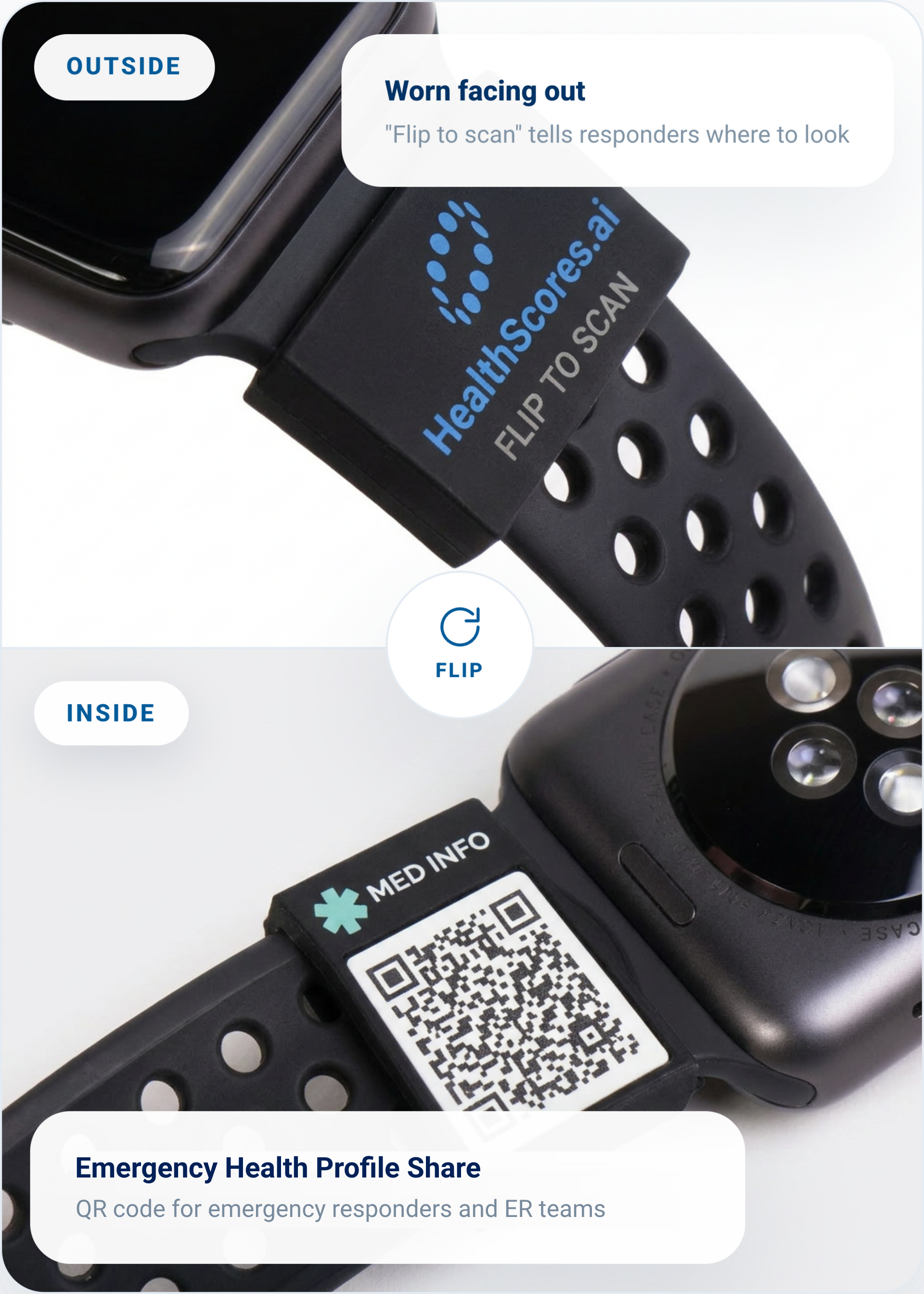
The HealthScores.ai Sleeve
Your emergency info, on your wrist
This silicone sleeve slides over your watch band. The HealthScores.ai mark faces out, while an Emergency Health Profile Share QR code sits underneath so responders see your allergies and medications the moment they scan it. It pairs directly with the emergency profile you already manage in the app, ensuring the information you choose to share stays current. Update your profile, and your sleeve is automatically up to date.
Slides over your existing watch band
Connects to the emergency profile you control
Access emergency info in one scan
Optional accessory for HealthScores.ai members. Sold separately.
Care Circle questions
Who can I add to my Care Circle?
Anyone you choose: family, friends, paid caregivers, professional advocates, and your doctors. Each person gets their own login and one of three access levels: Advocate, Caregiver, or Viewer.
Can someone in my Care Circle edit my Health Profile?
Only if you make them an Advocate. Advocates can view and edit your health records on your behalf. Caregivers can view them without editing, and Viewers see your dashboard only.
What if I'm the caregiver?
Your parent or spouse adds you to their Care Circle and sets your access level and the areas you help with. Depending on that access, you'll see their HealthScore, Health Profile, and recommended actions from your own account. Access is currently open to Medicare recipients and their caregivers. Access is currently open to Medicare recipients, caregivers, and advocates through an invitation-only process.
Can I remove someone?
Yes, at any time, from the web app or the mobile app.
Does it cost anything to be in a Care Circle?
No. Being in someone's Care Circle is free and isn't a membership. You're invited by the member and see what they allow.
Bring the people who help you into your health
Request access and set up your Care Circle from your first session. Helping a parent? Joining their Care Circle is free.
