Health Profile
All your health records, in your control
The Health Profile is the foundation of HealthScores.ai. It holds everything about your health in one place you own, feeds your HealthScore, and becomes the document you share at every visit.
Medicare members get a free trial of the web app for 90 days.
Your record
What is a Health Profile?
A Health Profile is a personal health record you manage in the HealthScores.ai app. Your records from your downloaded patient portals are stored as a Google Doc file in your personal Google Drive, which HealthScores.ai connects to.
You build it once and update it as things change. The web app is the easiest place for a long first session. The mobile app is where you make quick edits from wherever you are.
How it works
From scattered paperwork to a shareable record in four steps
01
Connect your patient portals.
Sign in to each provider’s portal through HealthScores.ai, or connect through Fasten Health, a secure service that helps you find your providers. Approve the connection, and your records come in, ready to use
02
Add what's missing.
Medications no portal shows, emergency contacts, insurance, and the lab results and discharge papers you've kept at home.
03
Connect what you wear.
Through the mobile app, activity, sleep, heart rate, and other vitals from your health apps join your profile and feed your HealthScore.
04
Share the right view.
Generate your shareable Health Profile document from the Clipboard or the web app.
The more your Health Profile holds, the more accurate your HealthScore, the more specific your recommended actions, and the more useful your notifications. That's how HealthScores.ai helps prevent avoidable ER visits.
Protection by design
You own the data
The difference between a Health Profile and a patient portal is custody. The hospital owns the portal; you get a login.
Your Health Profile is stored in your own Google Drive, not on a health system's server and not in a portal that belongs to someone else. We do not hold a copy. Nothing leaves it until you decide who gets it.
Find HealthScores.ai in the CMS Medicare App Library on Medicare.gov. Members verify their identity through ID.me.

The HealthScores.ai Sleeve
Your emergency info, on your wrist
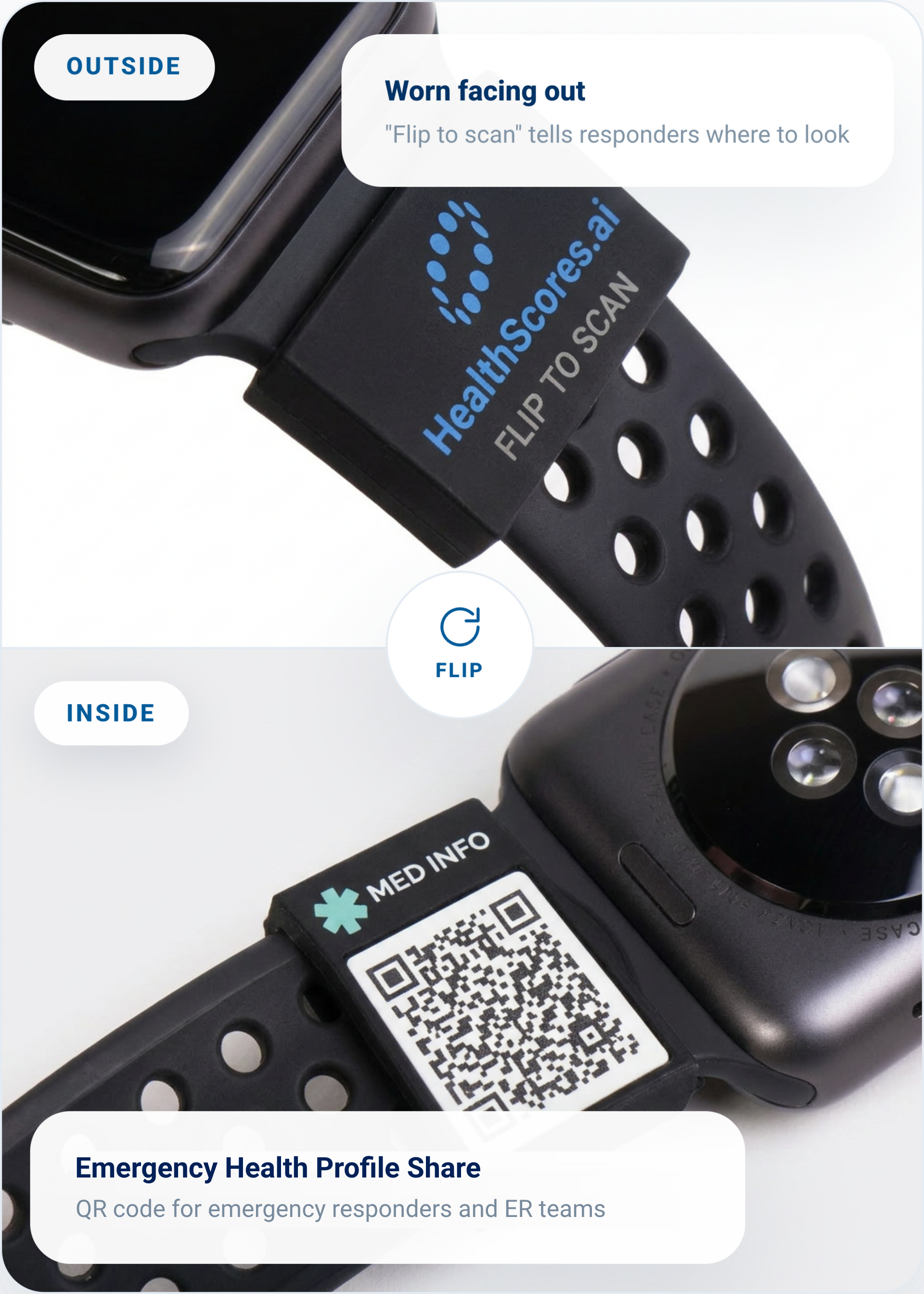
This silicone sleeve slides over your watch band. The HealthScores.ai mark faces out, while an Emergency Health Profile Share QR code sits underneath so responders see your allergies and medications the moment they scan it. It pairs directly with the emergency profile you already manage in the app, ensuring the information you choose to share stays current. Update your profile, and your sleeve is automatically up to date.
Slides over your existing watch band
Connects to the emergency profile you control
Access emergency info in one scan
Optional accessory for HealthScores.ai members. Sold separately.
Health Profile questions
Where is my Health Profile stored?
In your own Google Drive, so you'll need a Google account to set it up. HealthScores.ai reads from it. We do not hold a copy.
Can I share only part of my profile?
Yes. The SMART Health Link shares what you choose to make visible. You control what goes in it and can change it at any time.
Can my Care Circle edit my profile?
Only the people you allow. You choose what permission to give each Care Circle member. A caregiver who helps manage your medications can update the list for you while someone else may only have permission to view it.
Does it connect to my doctor's EHR?
You can import your medical records from available portals. Sign in to your provider's patient portal through HealthScores.ai, authorize the connection, and your data imports into your Health Profile in a format the app can use. The records land in storage you own, not on HealthScores.ai. Sharing back out works differently. Your provider's staff import the FHIR file you share, and that's a manual step on their side.
Start the health record you'll actually keep.
Request access, and we'll help you set up your Health Profile.