
Health information sharing
Three ways to share your info. You choose which one, and what goes in it.
Every visit is different. A check-in at a new practice, a nurse who needs your medication list right now, a paramedic who finds you unable to answer. HealthScores.ai gives you a way to share the health information needed for every type of visit, and every one is a *qr.md code you control.
*qr.md stands for "Quick and Ready Medical Documents", and it's what every code opens to ensure the right medical documents are available at the right time.
Why three
Why are there three QR codes?
Sharing health information isn't one job. Sometimes a person needs to look at your information in the next thirty seconds. Sometimes an office needs a copy they can file into their own system. Sometimes you're not in a position to hand anyone anything.
One code can't do all three well, so HealthScores.ai uses three, each built for its moment. Two of them live on your dataDocument™, which you open from the Clipboard in the app. The third lives on your wrist.
How it works
From your Health Profile to the right person in four steps
01
Keep your Health Profile current.
Everything you share is built from it, so the codes are only as good as what you keep there.
02
Choose what to share.
You control what details in your health profile are visible to others. Your Sleeve's Emergency Profile is pre-set for emergencies and ready to go.
03
Open the right code.
Your shareable Health Profile document in the Clipboard carries the SMART Health Link and the shareable dataDocument QR code. The sleeve's QR code links to your Emergency profile in the HealthScores.ai app.
04
They scan.
A phone camera opens the qr.md link, and the person sees the view that code was built for. Nothing more.
The three codes
Which QR code should you use?
All three are qr.md codes, and all three are yours. Nobody sees anything unless you generate a code or wear one.
An office needs a copy for their system
dataDocument® QR Code
Shares the health information you chose to make visible within a dataDocument, drawn from your Health Profile: your portal records, completed questionnaires, and anything you’ve uploaded. Show it from your mobile app at a new specialist’s front desk instead of filling out the same forms again.
Lives on: Your shareable Health Profile dataDocument
A standardized format health records use
SMART Health Link QR code
Produces a structured FHIR file that a practice's staff can import into their own system, so a new doctor starts with your history instead of a blank form. The import is a manual step on their side.
Lives on: Your shareable Health Profile dataDocument
You can't provide information, or you're unresponsive
Emergency Health Profile QR code
Opens your Emergency Profile, a separate emergency view with your identity and contact details, allergies and alerts, primary emergency contact, care team, and HealthScores breakdown. You’ll find it on your dataDocument and on your sleeve. Built for the moments you can’t speak for yourself.
Lives on: The sleeve you wear and your shareable dataDocument
Why it matters
A visit that starts with your history instead of a clipboard
This is the sharing half of the HealthScores.ai story. Walk into a practice with your shareable health profile document, and you don't rewrite your medication list from memory. A front desk scans your SMART Health Link QR code instead of waiting for a folder. A paramedic scans your sleeve instead of guessing about allergies.
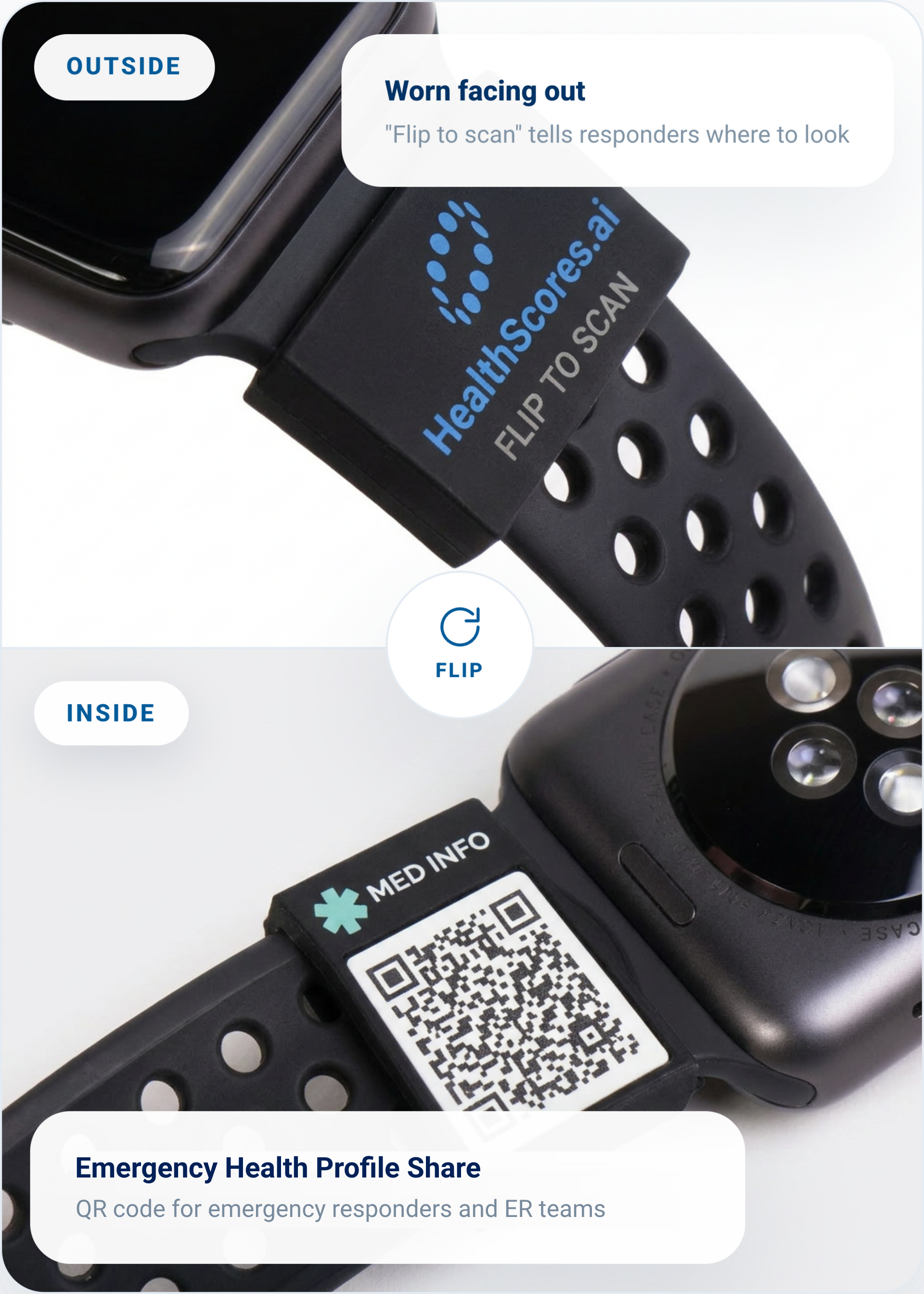
The HealthScores.ai Sleeve
Your emergency info, on your wrist
This silicone sleeve slides over your watch band. The HealthScores.ai mark faces out, while an Emergency Health Profile Share QR code sits underneath so responders see your allergies and medications the moment they scan it. It pairs directly with the emergency profile you already manage in the app, ensuring the information you choose to share stays current. Update your profile, and your sleeve is automatically up to date.
Slides over your existing watch band
Connects to the emergency profile you control
Access emergency info in one scan
Optional accessory for HealthScores.ai members. Sold separately.
Sharing questions
What is a SMART Health Link?
A SMART Health Link is a QR code or web link that shares the health information you choose, using an open standard that compatible health systems can read. In HealthScores.ai, it lives on your shareable Health Profile document, so someone can view what you chose to share in seconds. Learn how SMART Health Links work.
Is the SMART Health Link my whole Health Profile?
No. It shares only the information you've chosen to make visible. Your full profile and your uploaded records stay in the app.
What if I lose my phone?
Your codes point to your profile rather than storing it, and you can regenerate your shareable Health Profile document from the web app at any time.
Share the right information with the right person, every time
Request access, and we'll help you build the profile behind all three codes.
